DPAC T2 Generator
The AerariumChain DPAC T2 Generator is a desktop application (macOS and Windows, under license) that AerariumChain provides to digitization providers and to the Digital Library. It builds the T2 update packages for 3D objects and gigapixels, verifies them before they are zipped, writes them to an external disk and issues a verification certificate with the log of every check and the paradata documents attached.
A T2 package is a delta on top of a T1 package already ingested by DPAC: it carries the updated METS (RECORDSTATUS="UPDATE_3D", header ID equal to the resource UUID assigned by DPAC), the paradata folder (the acquisition setup and processing reports) and the RAW_3D folder with the raw acquisition data. The images already in the T1 (the thumbnail and the view renders) go into the T2 as well, copied byte for byte from the T1 package and verified against the METS checksums; master and derivative stay references (option: images only, every T1 file, none).
The tool has two parts: a builder (a guided procedure) and a checker (the verification interface with the panels of generated and failed packages). Everything the window does can also be driven by a local HTTP API, so that a provider can integrate the packager with its own system and keep the user interface for manual work on the PC.
Installation, sign-in and license
The app works only with an AerariumChain Hub account and an active license. The license holder (for the Digital Library, AerariumChain) decides which accounts may use it and on how many computers.
Download the installer. On the Hub, menu DPAC → DPAC T2 Generator, the page shows the account's license and the buttons for macOS (Apple Silicon or Intel) and Windows. The download is recorded under the account. Without an active license the buttons are disabled.
macOS. Open the .dmg file and drag the app into Applications. The app is signed and notarized by Apple: it opens without warnings. If macOS still shows an "app not verified" message (for example for a file copied from a USB stick), open System Settings → Privacy & Security and choose Open Anyway, or right-click the app → Open.
Windows. Run AerariumChain DPAC T2 Generator Setup <version>.exe and follow the setup (you can choose the folder). Until the installer is signed with the Windows code-signing certificate, one of these messages may appear:
| Message | What to do |
|---|---|
| "Windows protected your PC" (Microsoft Defender SmartScreen) | click More info, check that the app is "AerariumChain DPAC T2 Generator", then Run anyway |
| The browser flags the file as "not commonly downloaded" | in the downloads list choose Keep (Edge: … → Keep → Show more → Keep anyway) |
| "Smart App Control blocked an app" | with Smart App Control on, Windows does not open unsigned apps: contact us for the signed version. The status is in Windows Security → App & browser control → Smart App Control |
| The company antivirus quarantines the file | ask your IT administrator to allow the installer and the app folder |
First launch. The app shows the license agreement (EULA) to accept, then asks you to sign in with your Hub account: the same session reads the Hub data, there is no second login. The license code, holder and expiry appear at the top; the same code is printed on the certificate and in the verification package of every package built.
License. Each computer you sign in on takes one installation of the license (reopening the app on the same computer takes no more). The license is renewed online every 30 minutes; without a network the app keeps working for up to 72 hours. When it expires, or if it is suspended, the app stops and tells you whom to contact.
Updates. New versions download on their own and install on restart (see below).
What the tool produces
For every package the destination disk receives one folder named after the delivery, so the folder listing reads one line per work:
<destination>/CANTIERE_LOTTO_PK_T2/
  CANTIERE_LOTTO_PK_T2.zip               the delivery for the Digital Library
  CANTIERE_LOTTO_PK_T2_CERTIFICATO.pdf   verification certificate
  CANTIERE_LOTTO_PK_T2_VERIFICA.zip      the verification bundle for the quality check (see below)
  CANTIERE_LOTTO_PK_T2/                  the delivery, not zipped, named like the ZIP (what the checks run on)
    <prefix>.xml                         METS T2 (UPDATE_3D, DPAC UUID, real SIZE and MD5)
    <prefix>_PARADATA_3D/                acquisition setup / survey sheet and processing report (PDF)
    <prefix>_RAW_3D/                     raw data: Artec export (PLY + photos), files, .acraw container or original project
    <prefix>_Thumbnail_3D/               thumbnail already in the T1, carried in the T2
    <prefix>_6ViewImages_3D/             view renders already in the T1, carried in the T2
  CANTIERE_LOTTO_PK_T2_VERIFICA/         the verification bundle, unzipped, named like its ZIP
The delivery ZIP contains only the content of the CANTIERE_LOTTO_PK_T2/ folder. Everything else stays outside the delivery.
For a gigapixel (D.PaC material HQ) the T2 has the same shape: the gigapixel T1 METS with the update status (UPDATE_HQ, or UPDATE_2D if the Digital Library asks for it: chosen in Settings), the folders <prefix>_PARADATA_HQ and <prefix>_RAW_HQ, and as raw data the input images of the photomosaic in RAW DNG with at least one shot with the ColorChecker, as required by the Ministry. The processing report describes stitching, alignment, colour calibration and the master image.
The package layout, the METS transformation and the checksum rules are the same ones used by the AerariumChain Hub pipeline, so a package built with the tool is identical to one produced by the Hub.
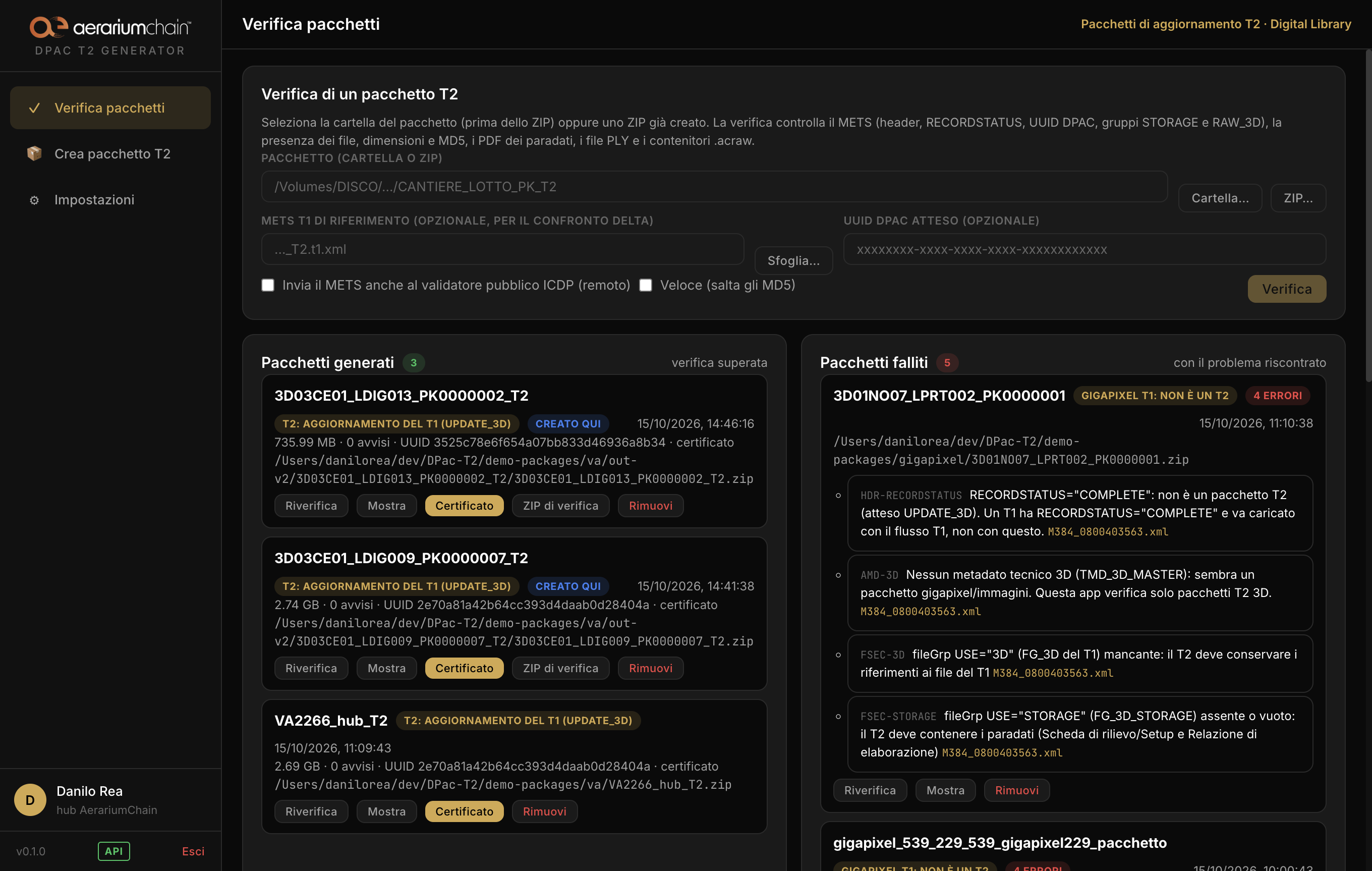
Building a package by hand
The Create T2 package section is a five step procedure.
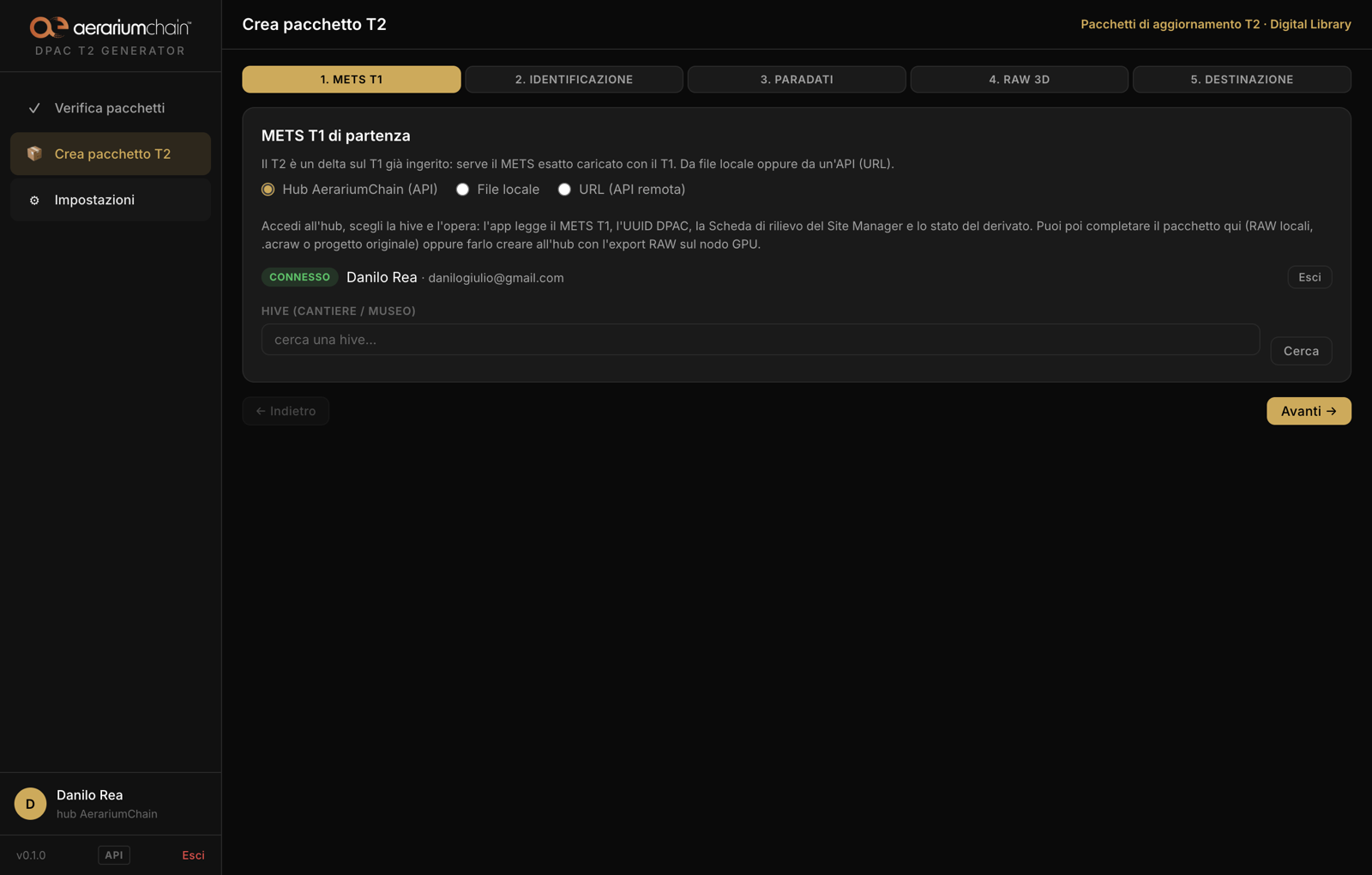
- T1 METS: the exact METS ingested with the T1, from a local file, from a URL, or read directly from the AerariumChain Hub (sign in with the Hub credentials, choose the hive and the work: the tool downloads the T1 METS, the DPAC UUID, the survey sheet of the Site Manager and the state of the derivative). With the T1 comes its package (from the hub only the needed entries are read), from which the thumbnail and the view renders are carried into the T2.
- Identification: site code, lot code and PK (they name the ZIP), the package prefix (names the METS and the folders), the resource UUID assigned by DPAC after the T1 ingestion, title and inventory number.
- Paradata: the two reports can be generated from the forms (the MiC templates are reproduced by the tool) or attached as ready PDF files; other documents can be added.
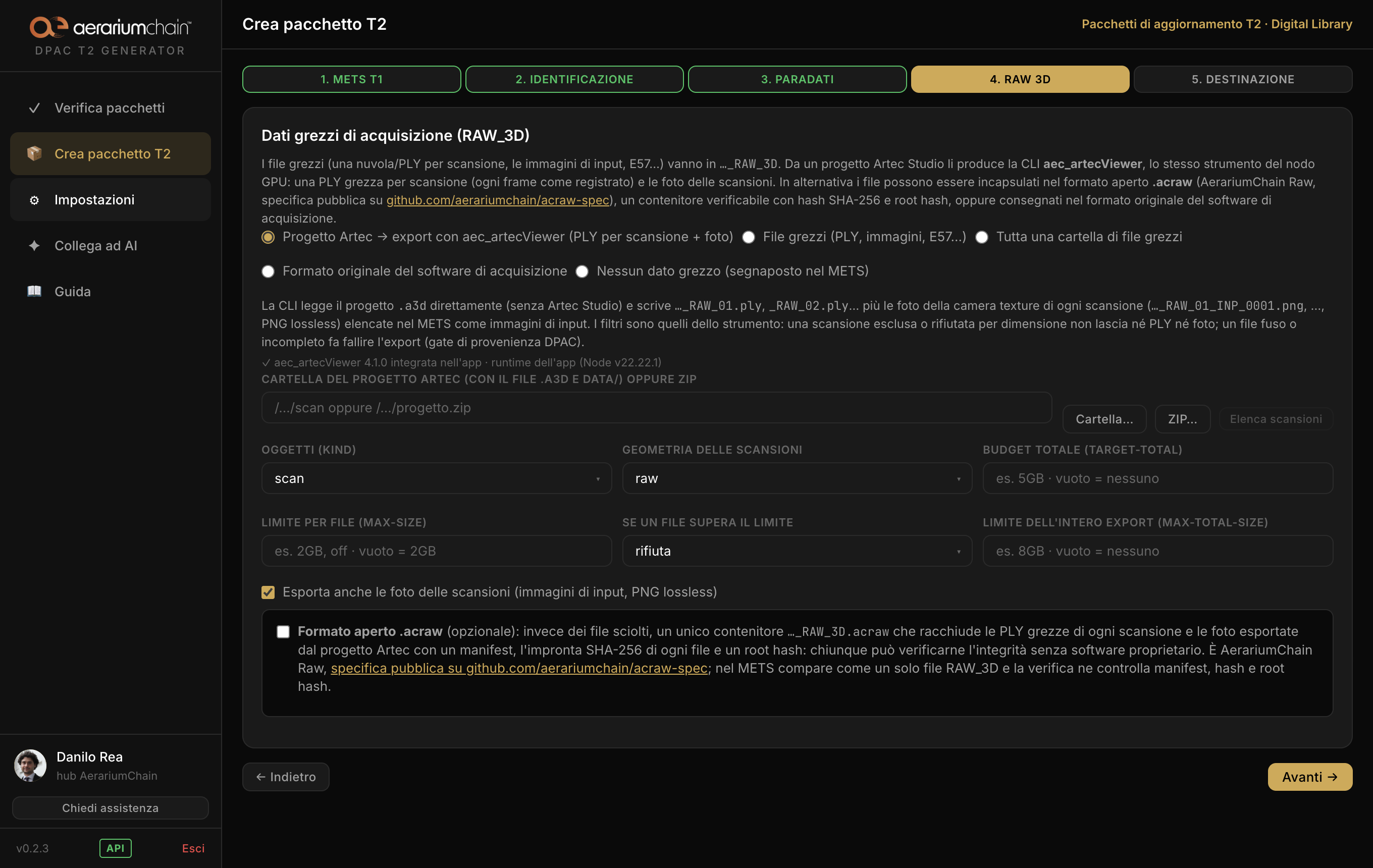
- RAW 3D: the raw acquisition data in one of four forms:
- the export from the Artec Studio project with the
aec_artecViewerCLI, the same tool the AerariumChain GPU node runs: one raw PLY per scan (every frame as recorded) plus the photos of the scans (the texture-camera images, lossless PNG,<prefix>_RAW_NN_INP_NNNN.png) listed in the METS as input images. The filters are the CLI's own (kind,scan-geometry,target-total,max-size,on-oversize): a scan left out or refused for size leaves neither PLY nor photos, a fused or incomplete file fails the export (the DPAC server's provenance gate). The project can be a local folder or ZIP, or the one registered on the hub, downloaded before the export; - raw files (one PLY per scan, images, E57 ...), copied and hashed;
- the open format
.acraw(AerariumChain Raw): instead of loose files, one container with a manifest, SHA-256 of every file and a root hash, verifiable by anyone without proprietary software; it applies to selected raw files as well as to the Artec export (PLY per scan + photos); specification at github.com/aerariumchain/acraw-spec; - the original format of the acquisition software: the project folder zipped without recompression, or an archive copied byte for byte.
- the export from the Artec Studio project with the
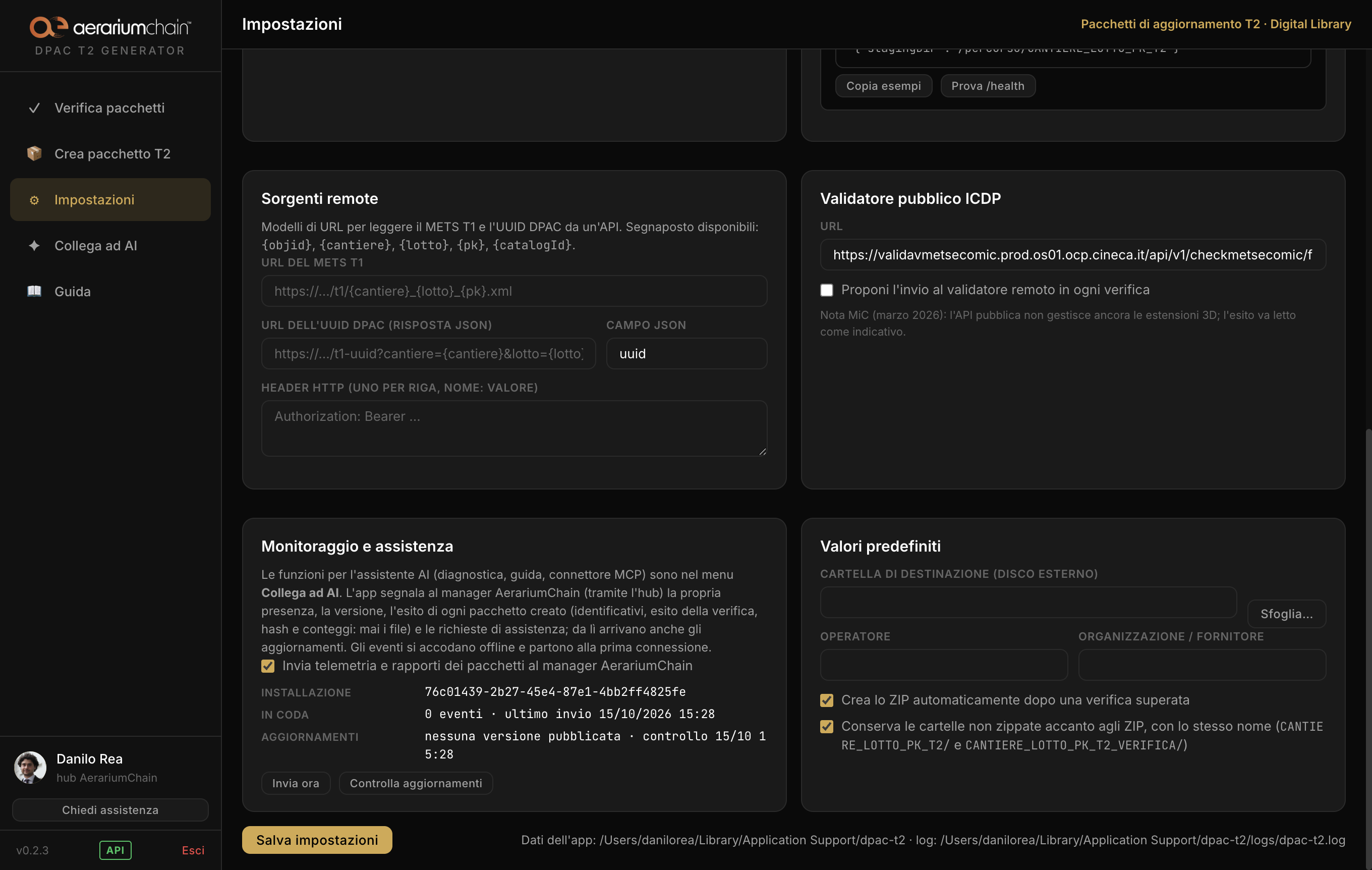
- Destination: the external disk (mounted volumes and free space are listed), automatic verification, ZIP (ZIP64 when needed) and certificate.
From the Hub, the tool can also ask the Hub itself to build the T2: the raw PLY are exported from the scanner project on a GPU node and the package is assembled there.
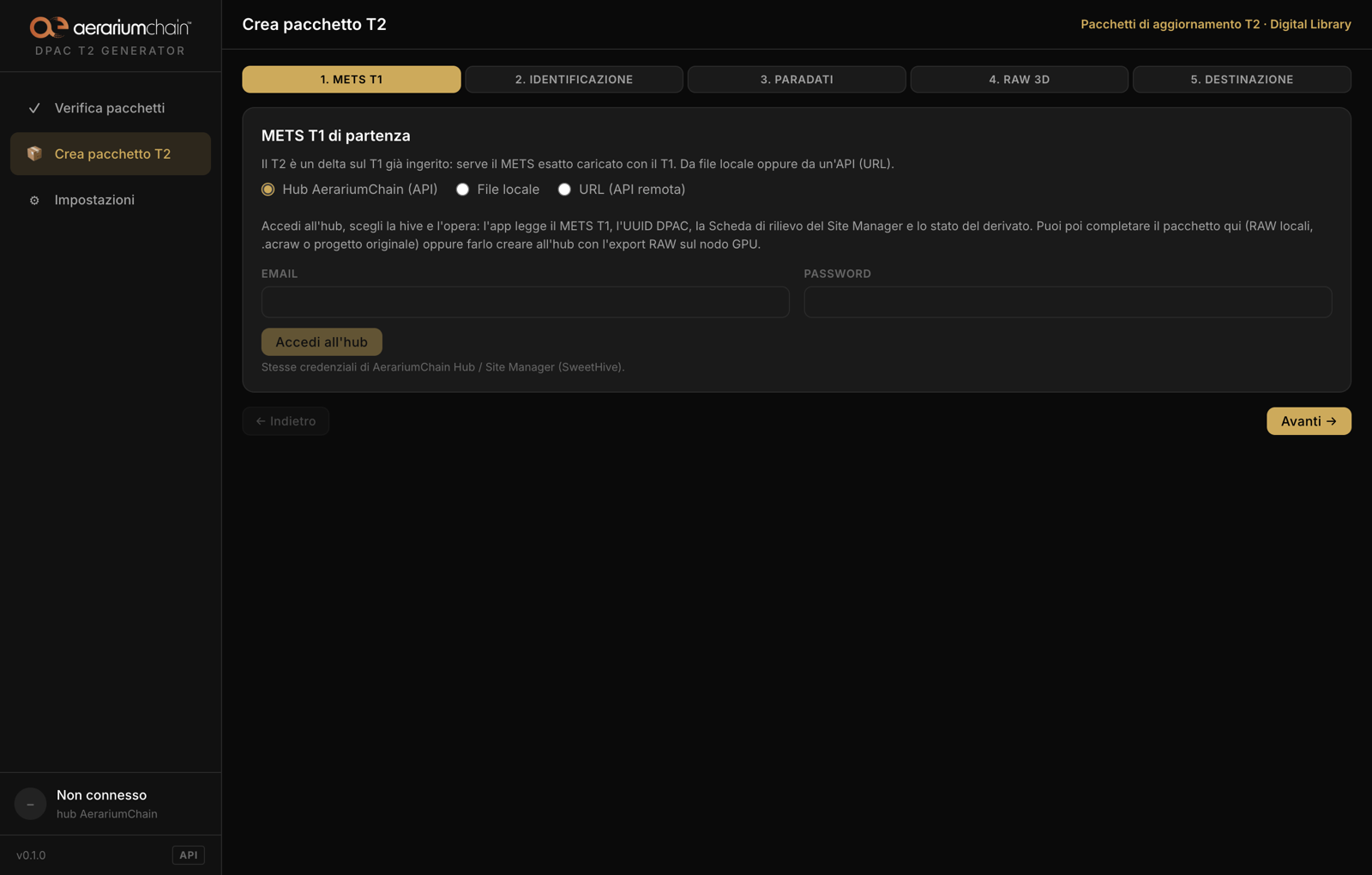
Verifying a package
The Verify packages section accepts the package folder (before zipping) or a ZIP already created. The checks cover:
- the METS: well formed XML,
PROFILE,OBJID, header (RECORDSTATUS, UUID,CREATEDATE, agents), descriptive and administrative sections, the required fields of the 3D technical metadata, duplicate identifiers; - the file section:
USEvocabulary, theFG_3Dgroup of the T1, theSTORAGEandRAW_3Dgroups, the names of the paradata documents; - every file declared in the T2 groups: presence,
SIZE,MD5,MIMETYPE,CREATED,ADMID; the signature of the PDF files; the header of the PLY files; the.acrawcontainers (container rules, manifest, hashes, root hash, structure); - the delta semantics: no file of the T1 inside the package, no file left undeclared;
- the comparison with the T1 METS, when given;
- optionally, the public METS ECO-MiC validator of ICDP.
Two panels keep the history: generated packages (verification passed) and failed packages, each with the problems found. Every rule has a stable identifier (HDR-ID, FSEC-STORAGE, FILE-MD5 ...) that is also reported in the certificate and by the API.
The verification bundle for the quality check
Beside every delivery the tool writes a verification bundle: the folder CANTIERE_LOTTO_PK_T2_VERIFICA/ and its copy CANTIERE_LOTTO_PK_T2_VERIFICA.zip (the unzipped folders can be switched off in the settings). It is meant for the Digital Library's quality check: whoever receives the delivery ZIP can check that it arrived intact, read the log of the checks and trace how it was built, without opening the package. For the package 3D03CE01_LDIG013_PK0000002_T2 it contains:
| File | What it is and what it is for |
|---|---|
3D03CE01_LDIG013_PK0000002_T2_CERTIFICATO.pdf |
the verification certificate (see below), a copy of the one beside the ZIP |
3D03CE01_LDIG013_PK0000002_T2.zip.md5 |
the MD5 fingerprint of the delivery ZIP in md5sum format: the hash, two spaces, the file name. From the folder holding the ZIP: md5sum -c 3D03CE01_LDIG013_PK0000002_T2.zip.md5 (Linux), md5 -r 3D03CE01_LDIG013_PK0000002_T2.zip (macOS), certutil -hashfile 3D03CE01_LDIG013_PK0000002_T2.zip MD5 (Windows). If the hash matches, the ZIP received is byte for byte the one produced |
3D03CE01_LDIG013_PK0000002_T2.zip.sha256 |
the same fingerprint with SHA-256 (sha256sum -c … on Linux, shasum -a 256 -c … on macOS): stronger than MD5, and the one printed in the certificate too |
rapporto.json |
the complete log of the checks, machine readable: ok, errors, warnings, the list items[] (every check has a stable id such as HDR-ID, FSEC-STORAGE, FILE-MD5, T1-FILES, a level `error |
build.json |
how the package was built: the build spec (identifiers, T1 source, paradata, RAW mode, options), where the T1 came from, the files produced with size and MD5, the export tool and its version |
t1.xml |
the T1 METS ingested by DPAC the T2 derives from: needed to redo the delta comparison (every T1 file cited in the T2 must keep the same SIZE and CHECKSUM); the app reuses it on its own when someone verifies the ZIP |
METS_<prefix>.xml |
copy of the delivered T2 METS |
METS_<prefix>_RELAZIONE_SETUP-ACQUISIZIONE.pdf, METS_<prefix>_RELAZIONE_ELABORAZIONE.pdf |
copies of the paradata documents, to read them without opening the package |
artec-manifest.json |
(Artec mode) the CLI manifest: for every raw PLY the source scan, total and used frames, HD/SD, MD5, and the list of photos |
inventario.txt |
one line per file of the package: MD5, size, METS group (STORAGE, RAW_3D, LOW, PREVIEW…), path |
LEGGIMI.txt |
what the folder is, verdict and identifiers of the package, the problems found and the list above |
An error blocks the ZIP; a warning does not. The bundle is produced also when a package is only verified (a folder or a ZIP received from a provider), next to the file checked.
The verification certificate
When a package passes, the tool writes a PDF outside the package: the identity of the package, the SHA-256 and MD5 of the METS and of the ZIP, the complete log of the checks with their outcome, the inventory of the files with their hashes. The paradata PDF files are not appended: they are in the delivered package and in the verification bundle. It is the document to keep with the delivery.
The local API
The window and the API share the same code. The API listens on the PC only (http://127.0.0.1:47821/api/v1, port and optional token in the settings) and is described by an OpenAPI 3.0 document served by the app at /api/v1/openapi.json and downloadable here: dpac-t2-openapi.json.
| Method | Route | Purpose |
|---|---|---|
| GET | /health |
state of the app |
| GET | /openapi.json |
the API contract |
| GET | /disks |
mounted volumes and free space |
| GET | /artec/status |
is the aec_artecViewer CLI usable? (path, Node, version) |
| POST | /artec/list |
list scans, frames and photos of an Artec project |
| POST | /build |
build a T2 package (job) from a BuildSpec |
| POST | /check |
verify a folder or a ZIP (job, or synchronous with wait: true) |
| POST | /zip |
verify and zip a package folder (job) |
| POST | /acraw |
wrap raw files in an .acraw container (job) |
| POST | /pdf/setup, /pdf/elaborazione |
generate the two paradata reports |
| GET | /jobs, /jobs/{id} |
state, result and events of a job |
| GET | /jobs/{id}/events |
the same events as Server-Sent Events |
| GET, DELETE | /packages, /packages/{id} |
the register of generated and failed packages |
Authentication: none by default; when a token is set in the settings, send it as X-Api-Token or as a bearer token. Every path in a request is a path on the PC where the app runs.
The build request
{
  "identity": {
    "codiceCantiere": "3D03CE05", "codiceLotto": "LDIG003", "pk": "PK0000002",
    "objid": "M489_XXXX",
    "dpacUuid": "6f1c2a3e-4b5d-4e6f-8a9b-0c1d2e3f4a5b",
    "title": "Title of the work", "inventory": "INV-1", "catalogId": "XXXX"
  },
  "t1": { "source": "file", "path": "/data/t1/M489_XXXX.xml" },
  "paradata": {
    "setup":        { "mode": "generate", "data": { "id_oggetto": "...", "setup_acquisizione": "SETUP_#1" } },
    "elaborazione": { "mode": "generate", "data": { "operator": "...", "derivFile": "M489_XXXX_DRV.glb", "derivSoftware": "Blender" } }
  },
  "raw": { "mode": "folder", "folder": "/data/raw/M489_XXXX", "extensions": ["ply"], "acraw": { "enabled": false } },
  "options": { "overwrite": true },
  "output": { "dir": "/Volumes/DISK/T2", "zip": true, "keepStaging": true }
}
t1.sourceisfileorurl(withheaders).paradata.*.modeisgenerate(from the data),file(an existing PDF,path) ornone.raw.modeisartec(withraw.artec:projectPathorprojectS3Key,kind,scanGeometry,targetTotal,maxSize,onOversize,maxTotalSize,photos),files,folder,original(withoriginalPathandoriginalVendor) ornone;raw.acraw.enabledswitches on the open container. The Artec CLI manifest is kept inverifica/artec-manifest.json.
The job flow
POST /build                      -> 202 { "jobId": "..." }
GET  /jobs/{jobId}               -> { "job": { "status": "running|done|failed", "result": ... }, "events": [...] }
GET  /jobs/{jobId}/events        -> text/event-stream: progress, done, error
Progress events carry step, percent and message; the result of a build carries the paths of the folder, the ZIP (with size and MD5), the verification report and the certificate. A synchronous verification:
POST /check  { "target": "/Volumes/DISK/T2/3D03CE05_LDIG003_PK0000002_T2.zip", "wait": true }
-> 200 { "report": { "ok": true, "errors": 0, "warnings": 0, "items": [...], "certificatePath": "..." } }
The same operations are available from the command line (dpac-t2 build, check, zip, acraw, pdf-setup, pdf-elab), with the same code.
Guide and AI support
This page is the app's guide: the Guide menu opens it in the browser. The same guide in Markdown, meant as context for an AI assistant, can be downloaded here: dpac-t2-guida.md (Italian).
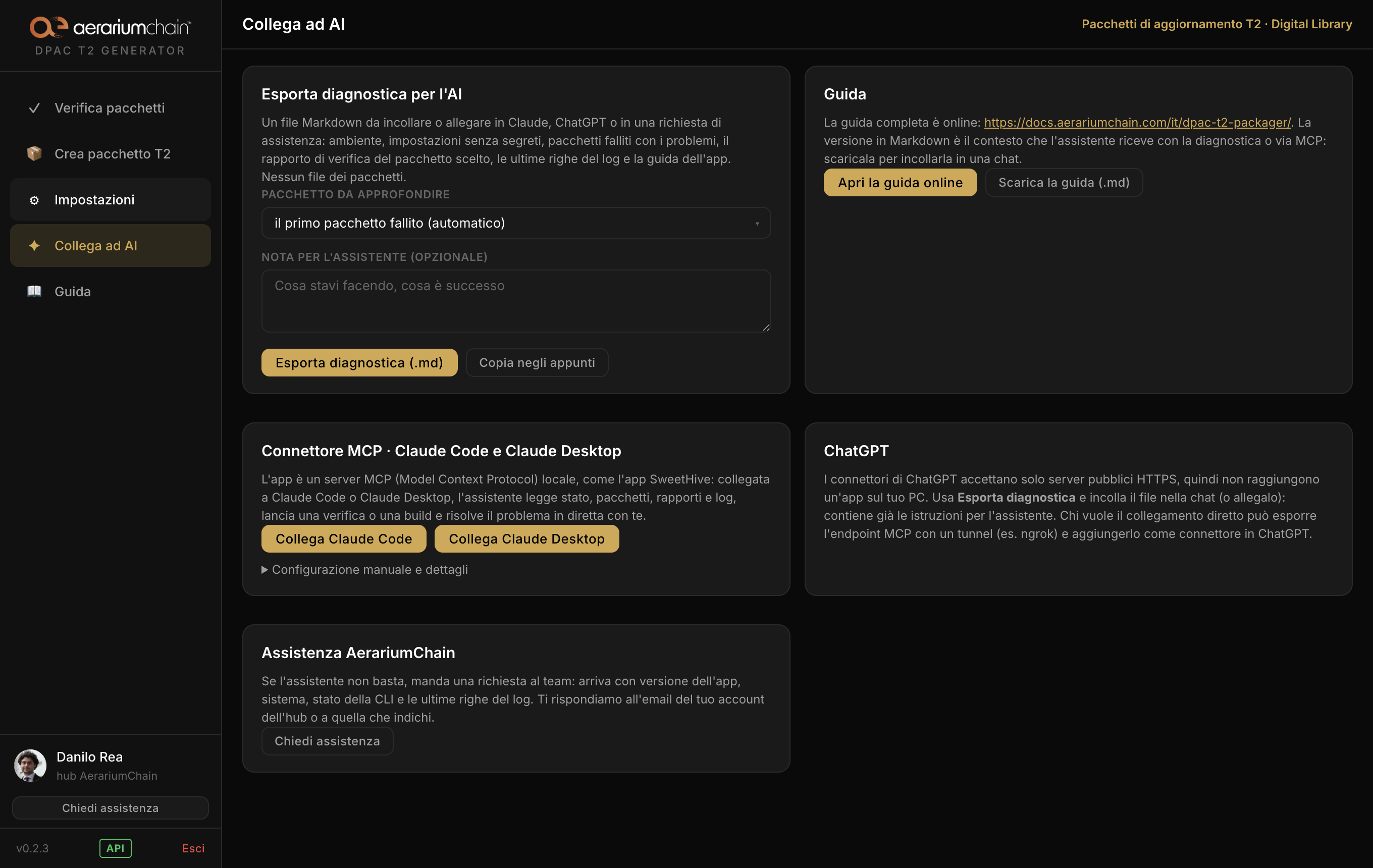
The Connect to AI menu gathers everything that lets an assistant (Claude Code, Claude Desktop, ChatGPT) or the AerariumChain team help when something goes wrong:
- Export diagnostics for the AI: a Markdown file (or a copy to the clipboard) with environment, settings without secrets, failed packages with their problems, the verification report of the chosen package, an operator note, the last lines of the log and the guide. Never the package files. The same button sits on every failed package.
- MCP connector: the app is a local MCP (Model Context Protocol) server. One click connects it to Claude Code or Claude Desktop, which can read state, packages, reports and log, run a check or a build and solve the problem live with the operator. ChatGPT needs a public server: use the diagnostics export.
- Guide (link and download) and Ask for support (a request to the team with the app's context).
Updates, monitoring and support
The app talks to the AerariumChain manager (manager.aerariumchain.com) through the Hub, with an installation id and, when the operator is logged in, with their session:
- Updates: on start and every six hours it checks whether a newer version has been published; if so, it downloads it in the background and the sidebar shows "Update X" with the progress and a Restart and update button (the install also happens on quit). AerariumChain can flag a version as mandatory or force the update of a single installation from the manager: the app installs it by itself as soon as no job is running.
- Monitoring: for every package built it sends a report with identifiers (package, prefix, DPAC UUID, work, hive), the outcome of the check with the problems found, hash and size of the ZIP, counts (paradata, PLY, photos, T1 images), export tool and durations. Never the files of the package. Events queue up offline and leave at the first connection; it can be switched off in Settings → Monitoring.
- Support: "Ask for support" in the sidebar opens a request to the AerariumChain team with the app version, the system, the CLI state and the last lines of the log; the answer goes to the email given.
Requirements and distribution
- macOS 11 or later (Apple Silicon or Intel) or 64-bit Windows 10/11; no other software is required (the paradata PDF files are generated by the tool).
- Space on the destination disk for the raw data and for the ZIP.
- An AerariumChain Hub account with an active license, and an internet connection at least once every 72 hours.
- The
aec_artecViewerCLI for the export from Artec projects is built into the app (taken from its own repository at build time) and runs on the app's runtime: nothing to install.
The installer is downloaded from the Hub with an account that has the license. For a license or for support contact us.